Overview
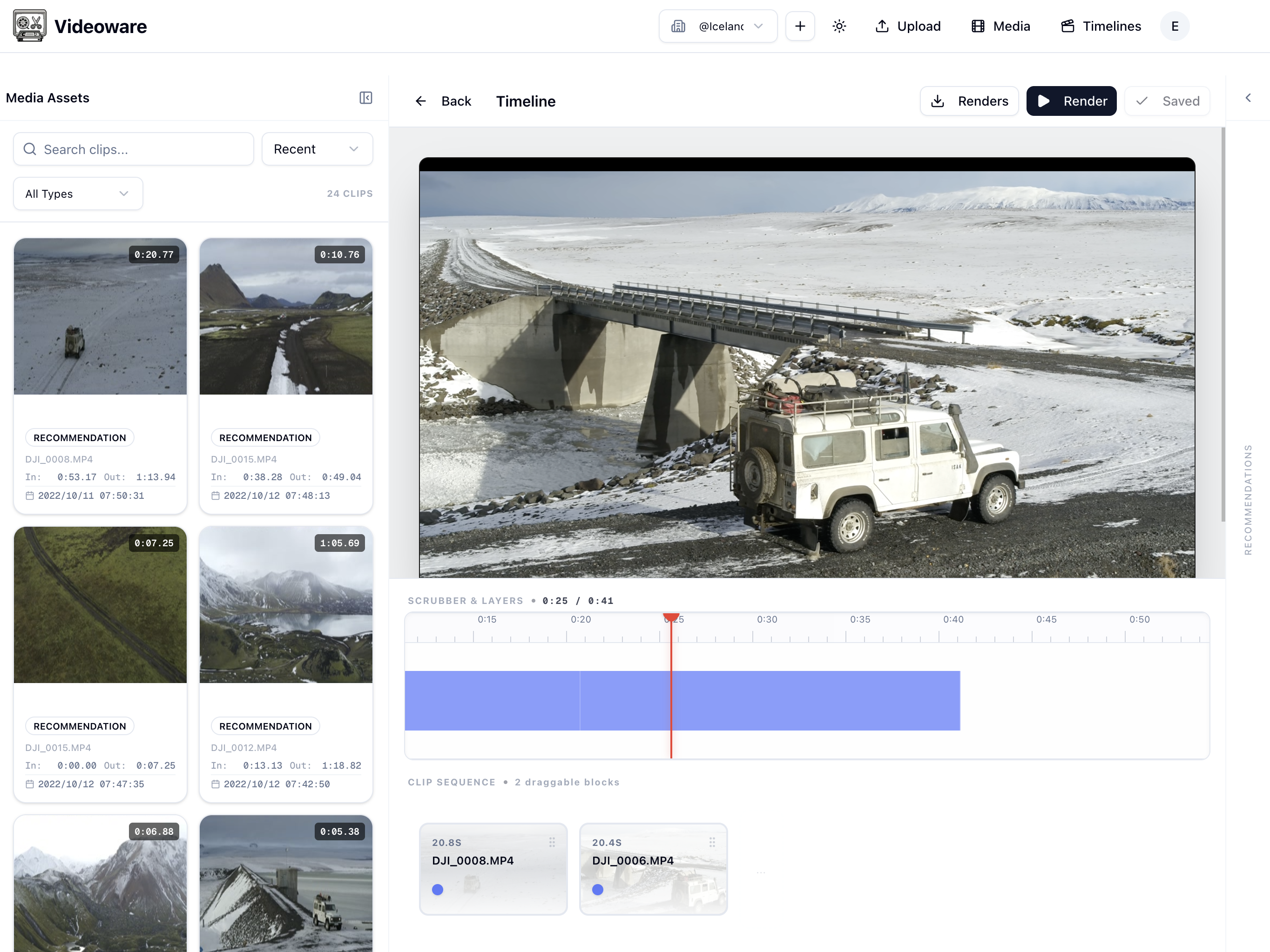
Video Ware is an open-source, self-hosted video editor. It pairs a browser-based
multi-track timeline with vw, a command-line interface that can do everything the
editor can: ingest footage, find moments by what's said or seen, cut clips, compose
timelines, and render the result.
Both interfaces sit on top of the same data, so an edit made from a terminal shows up in the editor in realtime, and vice versa. Everything runs on your own hardware — your media never has to leave your server.
Two interfaces, one editor
The editor is a real editor: multi-track drag-and-drop timeline, nested timelines, captions and title cards, live preview, and frame-accurate trims. Nothing about it requires the command line.
The CLI is an interface, not an AI feature. It exposes the full editing model — uploads, clips, tracks, placement, segment edits, renders — as commands with structured JSON output. Anything that can run a command can now edit video: a shell script, a build pipeline, or an AI agent working on your behalf. Video Ware isn't an "AI video editor"; it's a video editor that AI happens to be able to use.
Editing from the command line
vw upload create raw/*.mp4                                  # ingest footage
vw label search "let's get started"                         # find moments by speech or visuals
vw label clip speech LABEL_ID --label "Cold open"           # turn a moment into a clip
vw timeline create "Episode 4" --tracks "Music,Interview,B-Roll"
vw timeline insert -t TIMELINE_ID --clips CLIP_ID --track 1
vw timeline render -t TIMELINE_ID --download episode-4.mp4
Fine edits work the same way — cut a filler word out of a clip, nudge one segment edge, then close the gaps it left behind:
vw media clip cut MC_ID --from 12.3 --to 13.1     # drop an "umm"
vw timeline clips trim TC_ID --segment 1 -s 45.4  # re-edge one segment
vw timeline compact TIMELINE_ID --track 1         # close the gaps
vw timeline doctor TIMELINE_ID                    # overlaps, gaps, stale durations?
Built for scripts and agents
The CLI is designed to be driven by something other than a human typing:
--jsoneverywhere — every list and edit command emits structured output, including awarningsarray that distinguishes "this was nudged/clamped/trimmed" from a hard error.vw workspace export— snapshots an entire workspace as a directory of JSON files, with a generatedINSTRUCTIONS.md, so an agent can read the project locally instead of paging through commands.vw timeline doctor— a health check that verifies an edit landed the way it was meant to: overlaps, gaps, dangling references, stale durations.--dry-runon placement commands prints the full plan — placements, trims, removals, shifts — without writing anything.- Safe by default — concurrent edits are detected rather than clobbered, no-ops skip the
write, and
--strictturns any warning into a non-zero exit code.
Features
- A real editor in the browser — multi-track drag-and-drop timeline, nested timelines, captions, and live preview, kept in sync with CLI edits
- A complete CLI —
vwcovers the entire workflow: upload, search, clip, compose, render - Searchable footage — speech-to-text with speaker labels, plus optional visual analysis (objects, faces, people, shot changes) via Google Cloud Video Intelligence, so "find where she says…" is a one-line search
- Entities — name the real person, product, or place behind anonymous detections once, then query everything they said or every time they appear, across all media
- Fast previews — thumbnails, scrub sprites, and proxy videos generated automatically on upload with FFmpeg
- Render to file — export any timeline to a finished video
- Workspaces — multi-user collaboration with role-based access
- Your storage — local disk or any S3-compatible bucket
Getting started
Choose the deployment style that fits your setup. Both options run the full app and keep data on your machine.
Option 1: Single container (simplest)
This option runs everything — web app, database, and worker — in one container, and is the fastest way to get started.
# Pull the latest image
docker pull ghcr.io/make-ware/video-ware:latest

# Run the container
docker run -d \
  --name video-ware \
  -p 8888:80 \
  -e POCKETBASE_ADMIN_EMAIL=admin@example.com \
  -e POCKETBASE_ADMIN_PASSWORD=change-this-password \
  -v ./data:/data \
  ghcr.io/make-ware/video-ware:latest
Once it starts, you can open:
- Web Application:
http://localhost:8888 - PocketBase API:
http://localhost:8888/api/ - PocketBase Admin:
http://localhost:8888/_/
Option 2: Docker Compose (split services)
This option runs the web app and background services separately. It is ideal if you want more control over each service.
Create an .env file in the docker/ directory:
cd docker
cat > .env <<EOF
# PocketBase Configuration
POCKETBASE_ADMIN_EMAIL=admin@example.com
POCKETBASE_ADMIN_PASSWORD=change-this-password

# Application URLs
NEXT_PUBLIC_POCKETBASE_URL=http://localhost:8090

# Worker Configuration (optional)
BULL_BOARD_PORT=3002
STORAGE_TYPE=local
ENABLE_FFMPEG=true

# Cloud storage (optional, for backups)
# GOOGLE_PROJECT_ID=your-project-id
# GOOGLE_CLOUD_CREDENTIALS={"type":"service_account","project_id":"your-project-id",...}
# GCS_BUCKET=your-bucket-name

# Logging
LOG_LEVEL=warn
EOF
Pull the images, then start all services:
docker compose pull
docker compose up -d
The services will be available at:
- Web Application:
http://localhost:3000 - PocketBase API:
http://localhost:8090/api/ - PocketBase Admin:
http://localhost:8090/_/ - Bull Board (Queue Dashboard):
http://localhost:3002
Install the CLI
brew tap make-ware/tap && brew install vw
vw login
Not on Homebrew? Every
GitHub release ships a standalone vw
build (Node.js >= 22 at runtime). The
CLI guide has the full
command reference and the end-to-end agent editing flow.
License
Video Ware is licensed under the GNU AGPL-3.0-only. You are free to use, modify, and self-host it, including for commercial purposes. If you modify Video Ware and distribute it or run it as a network service, you must make your complete source code available to users under the same license.